Announcement

Collapse
No announcement yet.

Topographical Off-Road Navigation - What's your solution?

Collapse
X
 
  • Filter
  • Time
  • Show
Clear All
new posts

  • Topographical Off-Road Navigation - What's your solution?

    I currently use Oziexplorer on a laptop with a USB GPS. Whilst it works well, its really impracticable due to its size.

    So what Im after an alternative solution that people are currently using. Please can you list the prices for hardware & software if you can & also the benefits & downfalls (if any) of your current system. A picture also tells a thousands words so that may help too!

    Thanks in advance
    Richard
    Richard
    2011 GXL TD Auto Prado Silver

  • #2
    I use a Garmin iQue M5. It's a Windows CE based PDA with an inbuilt GPS.

    Good points:
    - was relatively cheap (bought about 9 months on eBay for ~$500)
    - comes with street navigation s/w
    - runs OziExplorer CE edition fine
    - I use a 4GB SD card for maps, and it's *just* enough
    - compact, easy to mount,
    - runs both ozi and street navigation simultaneously
    - battery is not too bad
    - runs plenty of other s/w.... eg. I use IE for CampGroundCorner (http://www.lrc.org.au/cgcorner/web/index.htm)

    Bad points:
    - navigation s/w is a bit slow compared to other consumer GPS's (apparently the M4 is faster even though it has a slower CPU!)
    - discontinued model, and Garmin haven't got any other WinCE based PDA's available.
    - because it runs Windows, it crashes occasionally and needs to be rebooted
    - doesn't support SDHD cards (so limited to 4GB - but test any 4GB cards before you buy because it only _officially_ supports cards up to 2GB)
    - screen is OK, but not bright enough for my liking especially when you're wearing Polaroid sunglasses.

    URL: https://buy.garmin.com/shop/shop.do?cID=165&pID=246

    hth
    .t8

    Comment


    • #3
      Thanks t8, this is exactly the sort of info i'm after.
      Richard
      2011 GXL TD Auto Prado Silver

      Comment


      • #4
        Hope Sharky doesn't mind me saying this but try and get a PM or reply from him. On the recent WA meet up he had a Garmin mapping GPS and as I had never had any experience with one I asked about it. I was that impressed I bought one the same off EBay. Haven't received it yet and I still am a GPS amature but his system impressed me!

        Comment


        • #5
          I used to use a car PC in the last vehicle
          http://www.sumicom.com.tw
          and an 8" touch screen mounted on the dash

          Pros. Can run whatever you want. Heaps of room for maps, mp3's movies navigation software photos etc. Screen size was fantastic, could see lots of maps, had internet access either through next G usb modem or whatever local unsecured wireless network.
          Not dangerous like a loose notebook on someones knee

          Cons
          Hard to mount the screen in the Prado. Would need to be inventive !!
          December 2007 Prado GXL diesel, Option Pack with traction control, rear airconditioning and curtain airbags. Lovells Springs and Bilstiens shocks, snorkel, front recovery points,
          ARB Bar with fog lights, ARB second battery system, sandgrabber mats, Pirelli ATR Tyres,

          Comment


          • #6
            > I currently use Oziexplorer on a laptop with a USB GPS. Whilst it
            > works well, its really impracticable due to its size.

            I was in the same situation. I ended up buying an IPAQ HX4700 (PDA with a larger 4" screen, than the standard 3.5" on most PDA's). I picked it up off ebay second hand, but in really good nick for just under $300. It came with one 2Gb card, to which I added another for a measly $24. (It's got both a CF and and SD card slot).

            I installed oziExplorerCE on it (as I already had OziExplorer for the PC, it was just an additional $40 for the CE version I think). I'm continuing to use the same Haicom HI204III mouse type GPS I was using with my laptop. (Just needed to use the combo power-&-data cable that came with the GPS originally). Also using the same maps, etc from the laptop.

            It's normally mounted on a RAM mount that clamps to the 'jesus bar' in my 95 series. Many others use suction cup mounts on the windscreen. The mount was about $85 from memory.

            Hope the info helps............

            John.

            Oh yes, If any of the WA guys want to have a look, I'll have it with me on the Lake Jasper trip.
            Ex 95 and 79 series owner, now FJ Cruiser owner.

            Comment


            • #7
              Originally posted by Team Piggy
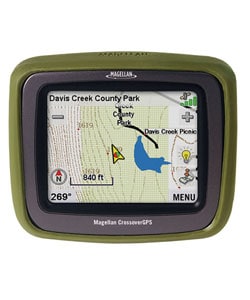
              Maybe you need to look at teh new Magellan Crossover.
              Its like a on dash GPS unit (tom tom mio etc) but can now take topographical maps !

              http://www.nextdestination.com.au/

              Yep I had a look at this one at the Melbourne 4x4 show. The maps were good & showed all the tracks in a particular area I was familiar with.
              I did some internet research on this unit though & found some people saying they were having some troubles with it....so does anyone have one of these & wants to tell us how it goes?

              Thanks, Richard
              Richard
              2011 GXL TD Auto Prado Silver

              Comment


              • #8
                **bump**

                I am very interested in hearing if anyone has got the Crossover and what your thoughts are.

                anyone??

                Comment


                • #9
                  Well I just bought a Crossover at the caravan and camping show.
                  So far I have found the on road (Vehicle Nav) Gps to be easy to use and similar to the tom tom.
                  I had a play with the (Outdoor) road section today and mapped a track while I drove around Perth.
                  The bread crumb feature was very accurate and I could copy it to my computer easily Sort of. :wink:
                  It took me a while to get my head around how to load things from the Gps to the computer and back but I eventually have worked it out.
                  The USB part is to hard to use for waypoints so you need to move the SD card to the computer.
                  It would off been a lot simpler if I had a card reader in built as you have to load a SD card to the PC and I am using the printer as a card reader.
                  After lots of swearing I found out DEFAULT is write protected and the reader will not write unless you un tick a little box located in the printer software. :evil: :evil:
                  You need to send information back to the card so you can load it onto the GPS.
                  The screen is a little bit small but I think it could be a good thing, because at night it would be to distracting if it was any larger.
                  For $950 you get two GPS units in one so we decided to buy it.
                  I think the GPS is easy enough for Jenny to use while I drive and I'll get better at the software side of things I hope.
                  It runs the same software as its brother, the Explorer XL and can do most of the main things that does.
                  I'll report back after Easter when we give it a real go. :idea:
                  Russ

                  This is the same map on both screens


                  2003 GXL Turbo Diesel,

                  Comment


                  • #10
                    Great work Russ. Must admit I wish mine had city navigator sometimes but it's all more money at the mo. My brother in law has an earlier Tomtom and it works OK but it's friggen huge, not the screen but a really bulbous back to it. Also the mounting for the car is also the charger like a motorola phone or similar and every decent bump and needs a little tweak to get it to charge up again.
                    I'm sure you'll get more used to it and you'll never look back. Also like the portable part as I hate giving things away when you sell a car.

                    Matt

                    Comment


                    • #11
                      Re: Topographical Off-Road Navigation - What's your solution?

                      Just asking now some PPrs have had their Magellan Crossover GPS for a while .
                      Are they happy with it ??
                      Ease of use ??
                      is the Topo mapping OK ??

                      Thanks
                      Spara

                      'Early to bed and early to rise --
                      Till you get enough money to do otherwise.'

                      Comment


                      • #12
                        Re: Topographical Off-Road Navigation - What's your solution?

                        Originally posted by spara
                        Just asking now some PPrs have had their Magellan Crossover GPS for a while .
                        Are they happy with it ??
                        Ease of use ??
                        is the Topo mapping OK ??

                        Thanks
                        I am quite happy with mine although the topo maps are a bit lacking in detail particularly with smaller tracks around WA. Still trying to figure how the tracks work though.

                        Cheers
                        Wayne
                        2000 VX Grande 3.4L , Bonnet/Light protectors , Toyota tow bar & bullbar,Hayman Reece brake controller, GME 3220 UHF, TJM Compressor,Nane 7200 spotties, Safari Snorkel, TJM XGS Gold suspension, Magellan Crossover, Cheap GPS with Ozi Explorer and Pradopoint sticker

                        Comment


                        • #13
                          Re: Topographical Off-Road Navigation - What's your solution?

                          I thought the topo maps were the same as the hema topos you can purchase from any Hema map supplier.
                          do you think they are the same ? or harder to see due to the small screen ?
                          Spara

                          'Early to bed and early to rise --
                          Till you get enough money to do otherwise.'

                          Comment


                          • #14
                            Re: Topographical Off-Road Navigation - What's your solution?

                            At present I do pre-trip planning from the laptop and transfer all waypoints and routes onto the GPS. I use Ozi on my lap-top. I may sometimes also take the laptop if I feel like it, but it is a pain in the backside so I generally don't.

                            If it's an area I don't know, I also do a screen shot of the area from the computer so I have a hard copy map in case anything should go wrong.

                            My GPS is a mapping one and whilst I have full nautical maps for the east coast on the gps, I don't have topographic mapping installed (apart from base map). I played aound with those shonky maps but I found that they weren't accurate enough for my likings. I am thinking about GPS TopoPLUS AU 5m though, but I've never used it before.
                            Black 2008 D4D GX, Bolle tint, Airtec snorkel, Hayman Reese tow bar, Staun deflators, ARB Air, front & rear extended diff breathers, Milford cargo barrier, Poly Air, 2" lift, XGS suspension, road tyres - 265/65x17 Grandtreks, play tyres - 265/70x17 Wrangler MTR's, ARB Sahara Bar, TMax 9000 winch, custom winch panel, Uniden UHF, Garmin 76csx with RAM mount, Eee PC with OZI, triple IPF 900XS spotties, rear ARB diff locker, Brown Davis underbody protection, Darren McRAE Auto Craft Rock Sliders

                            Comment


                            • #15
                              Re: Topographical Off-Road Navigation - What's your solution?

                              For me, I use the free ShonkyMaps with ShonkyContours and have found them very reliable so far.

                              Originally posted by JamesC
                              I played aound with those shonky maps but I found that they weren't accurate enough for my likings
                              James, I'm curious where you found them lacking. I don't carry an altimeter, though in my travels the ShonkyContours seem pretty close to other paper-based topo maps I've carried. I presumed the data source was the same... i.e. Geoscience Australia.

                              Cheers,
                              LFaR.
                              [size=1][color=#770000]29Feb12:[/color][color=#777700]12GXLTD Auto, ARB Deluxe Winch bar, WARN 9.5xp Winch, IPF 900XS, Tow, Safari snorkel, Front + Rear Recovery points, ARB OME NC Sports, ATZ-4Rib[/color][color=grey], Silver[/color]. [color=orange][b]MaxTrax[/b][/color], [color=maroon]ScanGuage II[/color], [color=blue]ARB CKMA12[/color], [color=deeppink]UHF: GME TX3440 AE4018K1 UNH047SX[/color], [color=darkgreen]Bushranger Air Jack[/color], [color=green]Staun + ARB Deflators[/color], [color=brown]WindCheetah Roof Rack[/color], [color=green]Foxwing[/color], [color=red]Super Charge MRV70, Redarc BCDC1220[/color], [color=darkblue]ARB 60L fridge[/color], [color=blue]MSA Fridge Dropdown slide[/color], [color=darkyellow]DRIFTA Drawers[/color], [color=gold]TJM Bash Plates[/color], [color=brown]TG150[/color].[/size]

                              Comment

                              Working...
                              X